
ParentSquare
ParentSquareEducation
4.312.91K Reviews
- Version
- 2.120.0
- Installs
- 5.00M
- Age Rating
- Everyone
Screenshots
Our Review of ParentSquare
 Analysis by Appyee
School communication works best when families know where to look, but in practice updates can arrive through a mix of inboxes, paper notes, calls, and separate classroom tools. ParentSquare is built around a simple idea: give a school community one place to communicate. I think that focus is its clearest strength, though its usefulness depends heavily on whether your child’s school actually uses it consistently.
A school hub, not a general-purpose family organizer
ParentSquare is an education app from ParentSquare, intended for communication between schools and families. It has been around since January 2015, and its current release is version 2.100.0. The app is free, rated for Everyone, and requires Android 7.0 or later. Its 4.4 average from around 42,000 ratings, alongside more than a million installs, suggests it has found a substantial audience, but those figures matter less than whether your own school relies on it for everyday messages.
I would not think of it as a replacement for every school system or a private social network for parents. Its value is more practical: it can give announcements, reminders, and conversations a common destination. That distinction helps set expectations. If teachers and administrators post regularly, the app can reduce the effort of checking several channels. If the school communicates elsewhere, installing it alone will not bring those messages together.
Where it can make a real difference
Imagine a weekday morning: you are getting ready for work, your child has an upcoming school event, and a teacher sends a change that affects what needs to go in the backpack. A dedicated school communication stream can make that update easier to spot than a note buried among unrelated email. Later, you can return to the same place to check a reminder or follow up with the school. That is the kind of ordinary friction ParentSquare is meant to reduce—not the work of parenting, but the small search-and-catch-up tasks around school.
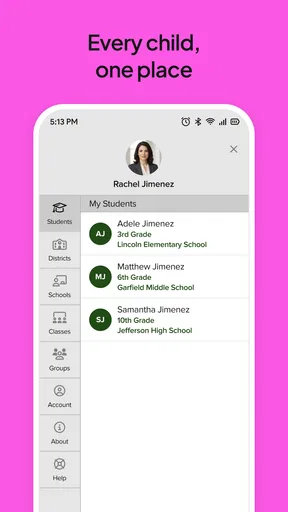
The biggest practical benefit is consistency. When families know that school notices and direct communication are handled in one familiar place, it becomes easier to build a routine: check for new messages at a convenient time, scan what needs action, and leave a question in the relevant school conversation rather than starting a new email thread. For households with more than one child, a shared school channel can also make it easier to keep school-related communication distinct from personal messages, although how well that works depends on how the school has organized its use.
What to expect from the school’s setup
ParentSquare is a private communication platform for schools, so it is not an independent source of school information. In practice, the school’s participation shapes the experience: what appears, how often updates arrive, and which communication habits families can use all depend on the community using it. Before relying on it as your main route for time-sensitive information, I would ask the school which notices it sends through the app and whether any other channel remains important.
That check is especially useful for families who share caregiving. Agree on who will keep an eye on incoming school messages and how you will pass along anything that needs action. A notification can be easy to miss during a busy day, so a quick routine—checking at a predictable time and confirming who is handling a reply—can be more dependable than assuming every alert will be seen immediately. ParentSquare can organize communication; it cannot decide who in a household is responsible for acting on it.
What is ParentSquare?
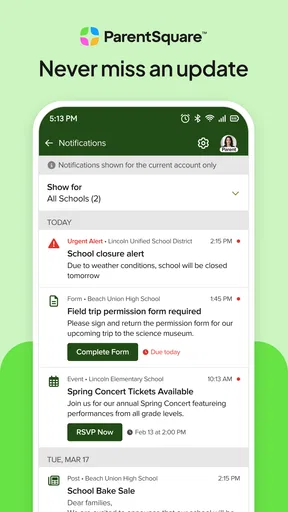
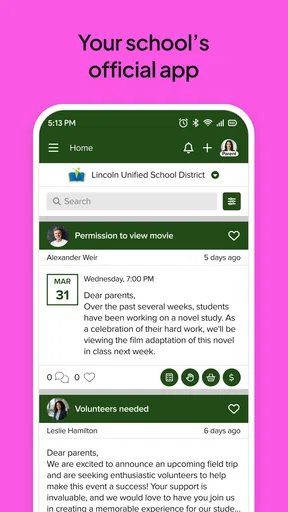
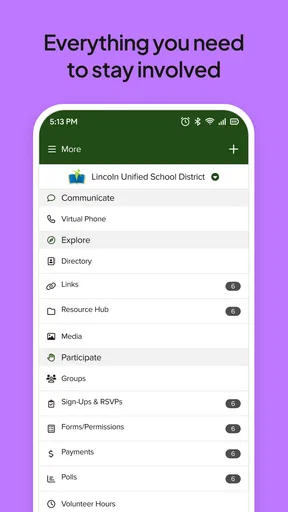
ParentSquare is a comprehensive app designed to streamline communication between schools, teachers, and parents. Whether it's announcements, event reminders, or direct messages, this app aims to keep everything in one place. It's like having a personal assistant for all things school-related.
Features That Make Life Easier
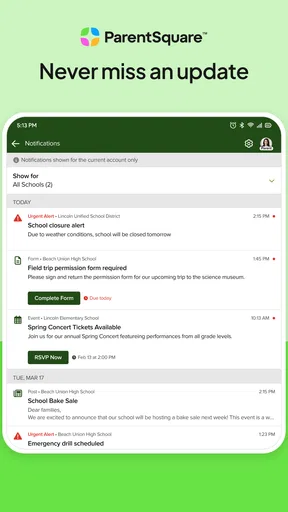
So, what exactly does ParentSquare bring to the table? One of the standout features is its ability to send messages in multiple formats. Whether you prefer emails, texts, or app notifications, ParentSquare has got you covered. This flexibility ensures you never miss out on important updates.
Another feature that caught my attention is the calendar integration. You can view all school events at a glance, and even sync them with your personal calendar. This means no more scrambling to remember when that parent-teacher meeting is scheduled.
"Communication is key, and this app holds the key to seamless school interaction."
User Experience
Let’s talk about the user experience. The interface is intuitive and user-friendly, even for those who aren’t tech-savvy. The app’s design is clean and organized, making it easy to navigate through messages, events, and reminders. Setting up the app is a breeze, and you’ll find yourself wondering how you ever managed without it.
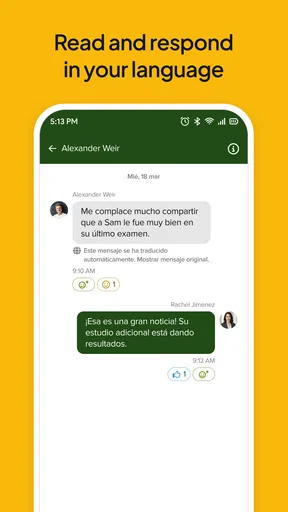
A particularly charming touch is the ability to choose your preferred language, ensuring that language barriers don’t stand in the way of staying informed. Plus, the app supports various accessibility options, making it inclusive for all users.
Security and Privacy
In today’s world, data security is crucial. ParentSquare takes this seriously by implementing robust security measures to protect user information. You can rest easy knowing that your personal and your child's information is safe and secure.
For a useful comparison, think of a normal email inbox as a wide-open desk: school messages sit beside work threads, receipts, and family plans. A class messaging group can be more focused, but it may also mix official notices with informal parent discussion. ParentSquare’s intended role is closer to an organized school channel than either of those alternatives. I would still keep email available until you know what your school sends where; the app is most useful as a reliable home for the school’s own communication, not as a reason to stop checking every other route immediately.
Small habits that make the app more useful
One helpful approach is to treat school messages as items to process, not simply notifications to swipe away. When you open an announcement, pause to identify whether it calls for a reply, a calendar entry, or a practical step at home. If a message concerns an event, recording the relevant detail in the calendar you already use can help prevent it from disappearing beneath newer updates. This is a simple workflow, but it turns a stream of information into a short list of actions.
For a household with multiple adults involved in school routines, agree on a division of labor before a busy week begins. One person might handle event logistics while another follows up on a classroom question. The point is not to create a complicated system around the app; it is to avoid duplicate replies or the assumption that someone else has seen an important note. If the school’s setup gives your family access to the same communication, use that shared visibility as a prompt to coordinate rather than as a substitute for talking to each other.
Language, access, and practical expectations
The ability to choose a preferred language can make school communication more approachable for families who are more comfortable reading in a language other than English. It is a meaningful advantage when the available language option matches what a household needs. Still, language settings do not remove every possible barrier: a message may contain school-specific terms, and families may still need to ask the school to clarify a detail. I would use the app to make information easier to follow, while treating direct clarification as sensible whenever an instruction is unclear.
Accessibility matters for the same reason. A readable, manageable communication channel can help more family members keep up, but the experience is personal: someone who finds a screen difficult to use may still prefer a phone call or another arrangement with the school. ParentSquare should support communication, not become a test of whether every caregiver can use one particular interface. If a family member cannot comfortably access it, ask the school how that person can receive essential updates too.
The limits I would keep in mind
The main trade-off is that a central app is only as complete as the school’s communication habits. A school might use it for some updates while continuing to rely on another channel for other matters. That can leave families checking more than one place, which weakens the promise of having everything together. I would give the school a little time to explain its routine, then decide whether the app is genuinely reducing missed messages or simply adding another inbox to monitor.
There is also a difference between receiving information and being able to act on it. A notice may arrive at an inconvenient moment, and a message that needs a thoughtful response can still require a later conversation. I would not treat a notification as proof that a time-sensitive issue has been handled. For anything urgent, use the contact method the school identifies for urgent matters instead of assuming a message inside an app will be seen right away.
Finally, the app’s broad purpose may not suit someone who only wants a calendar, or a family whose school already has a communication method that works well. Adding another account and another place to check has a real cost in attention, even when the app itself is free. If the school does not use ParentSquare, or if its chosen channel is already clear and dependable, there may be little benefit in trying to make this one your personal organizer.
Who I would recommend it to
I would recommend ParentSquare to parents and caregivers whose school actively uses it for announcements, event information, and direct communication. It is especially appealing if school details are currently scattered across a crowded inbox and informal conversations, or if more than one adult needs a clearer way to coordinate around school updates. It may also help families who value a preferred-language option and want school messages gathered in a familiar place.
I would be more cautious if you expect the app to automatically collect information from every teacher, school office, or outside calendar. It is not a universal school directory, and it cannot make a school adopt a consistent process. Families who prefer phone calls, need a different accessibility arrangement, or already have a dependable channel should ask whether ParentSquare will add something useful before making it part of their routine. The right choice is the channel your school actually checks and your household can realistically maintain.
My final take
ParentSquare is most convincing as a shared school communication space, not as a magical cure for missed messages. The idea is useful, and a steady school routine can make it easier to find announcements, keep track of events, and follow up in context. Its weaker side is the reliance on local habits: if the school divides information across multiple channels, families may still have to do some of the sorting themselves.
For me, the sensible first step is to confirm how your school uses it, then try a simple routine for checking messages and capturing anything that needs action. That gives you a fair way to judge whether it reduces everyday confusion without expecting it to replace every conversation or calendar. If your school is committed to using it and your family wants a clearer home for school updates, I think it is worth trying. If not, choosing the channel that is already dependable is the more practical decision.
Privacy and Permissions
See what permissions an app requests and how it handles your data.
- Calendar
- read calendar events plus confidential information, add or modify calendar events and send email to guests without owners' knowledge
- Phone
- read phone status and identity
- Photos/Media/Files
- read the contents of your USB storage, modify or delete the contents of your USB storage
- Storage
- read the contents of your USB storage, modify or delete the contents of your USB storage
- Camera
- take pictures and videos
- Microphone
- record audio
- Wi-Fi connection information
- view Wi-Fi connections
- Device ID & call information
- read phone status and identity
- Other
- view network connections, pair with Bluetooth devices, access Bluetooth settings, connect and disconnect from Wi-Fi, control flashlight, full network access, change your audio settings, control Near Field Communication, run at startup, prevent device from sleeping
Verdict
Strengths of ParentSquare
- User-friendly interface for parents.
- Real-time updates and notifications.
- Easy event scheduling and RSVPs.
- Secure messaging with teachers.
- Multilingual support for diverse communities.
Limitations of ParentSquare
- Limited customization options.
- Occasional notification delays.
- Some features require premium.
- Learning curve for new users.
- Mobile app needs frequent updates.
Other Releases by ParentSquare
View All
StudentSquare
Education3.3
Similar Picks in This Category
View All
Duolingo: Language Lessons
Duolingo4.7

Google Classroom
Google LLC2.8

Unacademy: Learn & Crack Exams
Unacademy3.2

Bible App for Kids
Life.Church4.4

Cake - Learn English & Korean
Cake Corp.4.7

Brainly: AI Homework Helper
Brainly4.5
Frequently Asked Questions
What is ParentSquare and what does it offer?
ParentSquare is a comprehensive communication platform designed specifically for schools. It facilitates seamless interaction between teachers, parents, and students by offering features like messaging, event scheduling, and attendance tracking. This app aims to enhance school-wide communication, ensuring that everyone stays informed and engaged with the educational process.
Is ParentSquare secure for sharing sensitive information?
Yes, ParentSquare prioritizes user security and privacy. It employs robust encryption methods to protect sensitive information shared within the platform. Additionally, the app complies with regulations such as FERPA and COPPA, ensuring that users' personal data and communications remain secure and confidential.
How does ParentSquare enhance parent-teacher communication?
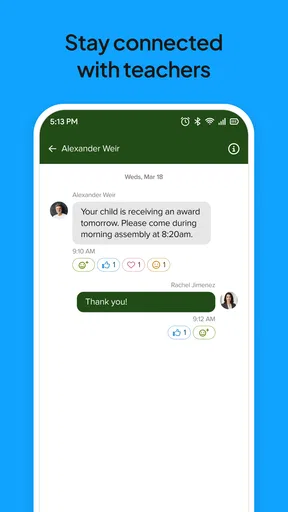
ParentSquare streamlines communication by providing a centralized platform where teachers can send updates, announcements, and reminders directly to parents. It supports direct messaging, allowing for private conversations, and offers translation features to accommodate non-English speaking families, thus fostering an inclusive communication environment.
Can ParentSquare be accessed on multiple devices?
Yes, ParentSquare is accessible on various devices, including smartphones, tablets, and computers. It offers both an app available for Android and iOS devices and a web-based version, ensuring that users can conveniently access the platform from anywhere, at any time, to stay updated with school communications.
Is there a cost associated with using ParentSquare?
ParentSquare is typically provided to users as part of a school’s communication services, meaning there is no direct cost for parents or students to download and use the app. However, schools may incur costs depending on the subscription plan they choose to implement the platform for their community.
